Invite your participants
Send a digital invitation to your event, whilst keeping full control of who can register.
Get more participants with invitations
It is easier and up to five times cheaper to take care of existing customers than to get new ones! You should therefore make use of our invitation feature, which is included in LetsReg Go, free of charge.
Create personalised invitations
Create email or SMS invitations, as easily as you would usually create a message using our communications tool. Feel free to adapt the design with our simple tools, enabling you to increase the likelihood that the participant will click through to your registration page.
Plan when to send your invitations
Select recipients, either by inviting previous participants from your events. Alternatively, you can upload an Excel list or upload individual people into the system. Within each digital invitation, the system will generate a unique invitation link, ensuring that you keep full control over who has used the invitation.
Everything in one place
With LetsReg, you don't need multiple systems to keep in touch with your participants, everything happens within one platform. This gives you full control and an overview, while reducing administration time.Frequently asked questions about invitations
-
How do I invite participants to a private event?
You invite participants to a private event by sending them a unique invitation link from LetsReg by email or SMS. Then, only invited recipients can register.
-
Can I run a closed course with invitations only?
Yes. With LetsReg you can run a closed course where only invited participants can sign up, using a unique invitation link sent by email or SMS. The booking page must be set to not public, so it cannot be discovered or shared without the link.
-
Does the invitation feature cost extra?
No. The invitation feature is included in all LetsReg accounts at no extra cost. There is no per-email charge for invitations sent.
-
Can I send invitations by SMS as well as email?
Yes. With LetsReg you can send invitations by both email and SMS — email is free, SMS is charged at a small per-message rate. This is useful for events where SMS is more effective at reaching participants.
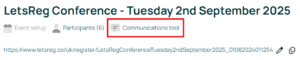
Click on your event, and click on the tab option “Communications tool.”
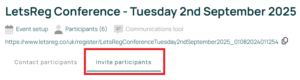
Click on “Invite participants.”
On the right-hand side you will see the options to either create an email or an SMS message.

Select the option you require to enter the relevant setup, and follow the instructions from the system.