Running a free event in the UK does not mean you have to manage it on a complicated spreadsheet. You still need to know who is coming, how many spaces are left, and how to contact people on the day. There is a booking system that handles all of that at no cost to you, because when your event is free, LetsReg charges nothing.
LetsReg is used across the UK by organisations including Volleyball Development Camps, Multi Sports Development Centres and Wokingham Fireworks, with over 11 million registrations processed since 2000.
Do you need a booking system for a free event?
Strictly speaking, no. You can run a free event on a Google Form, a Facebook event, a colossal spreadsheet, or a reply-all email chain.
But here is what you lose without a proper system in place:
You have no real-time count of who has signed up and how many spaces remain
You cannot send a reminder message to all attendees at once
You cannot easily cancel the event, add people to a waiting list or inform your attendees of any changes
You have no record of who turned up to your event
For a one-off picnic with ten friends, that is not a problem. However, for a community fitness session, a taster day, a club open evening, or any event where numbers really matter – a booking system saves you a meaningful amount of admin, even when money is not involved.
The good news: For free events with free sign-ups, a free booking system for small businesses should cost you nothing. If a tool charges you per sign-up on a free event, that is worth questioning.
What does a booking system for a free event actually do?
A good system handles the basics that a spreadsheet cannot:
Registration page – a dedicated link that you share, not a form you have to build manually from scratch every time. Attendees sign up, and you get a list updated in real-time.
Capacity limits – set a maximum number of spaces. When it fills, registration closes automatically meaning that you do not have to monitor it.
Automatic confirmation emails – attendees get a confirmation email the moment they sign up. You do not need to send it manually.
Waiting list – if your session fills up, interested people join a waiting list and are notified if a space becomes available.
Attendee messaging – send a reminder, a location update, or a cancellation notice to everyone on the registrations list in one easy step.
Check-in on the day – mark of who has arrived from your phone, ensuring that you have an accurate record.
For free events, LetsReg provides all of this at no charge.
How to set up a free event in the UK — step by step
Step 1 – Create your event
Add your event name, date, location, and a short description. Upload an image if you have one.
Step 2 – Set your event to free
Select the free event option or set the ticket price to £0. Because there is no card processing involved in a free sign-up, there is no fee for free events.
Step 3 – Set your capacity
Add the maximum number of attendees. LetsReg closes registration automatically when you reach it.
Step 4 – Publish and share
You get a registration link. Share it via email, WhatsApp, your club newsletter, or your website. Attendees sign up directly.
Step 5 – Manage from your dashboard
See your attendee list in real time, send messages, and check people in on the day.
When does a booking system cost money?
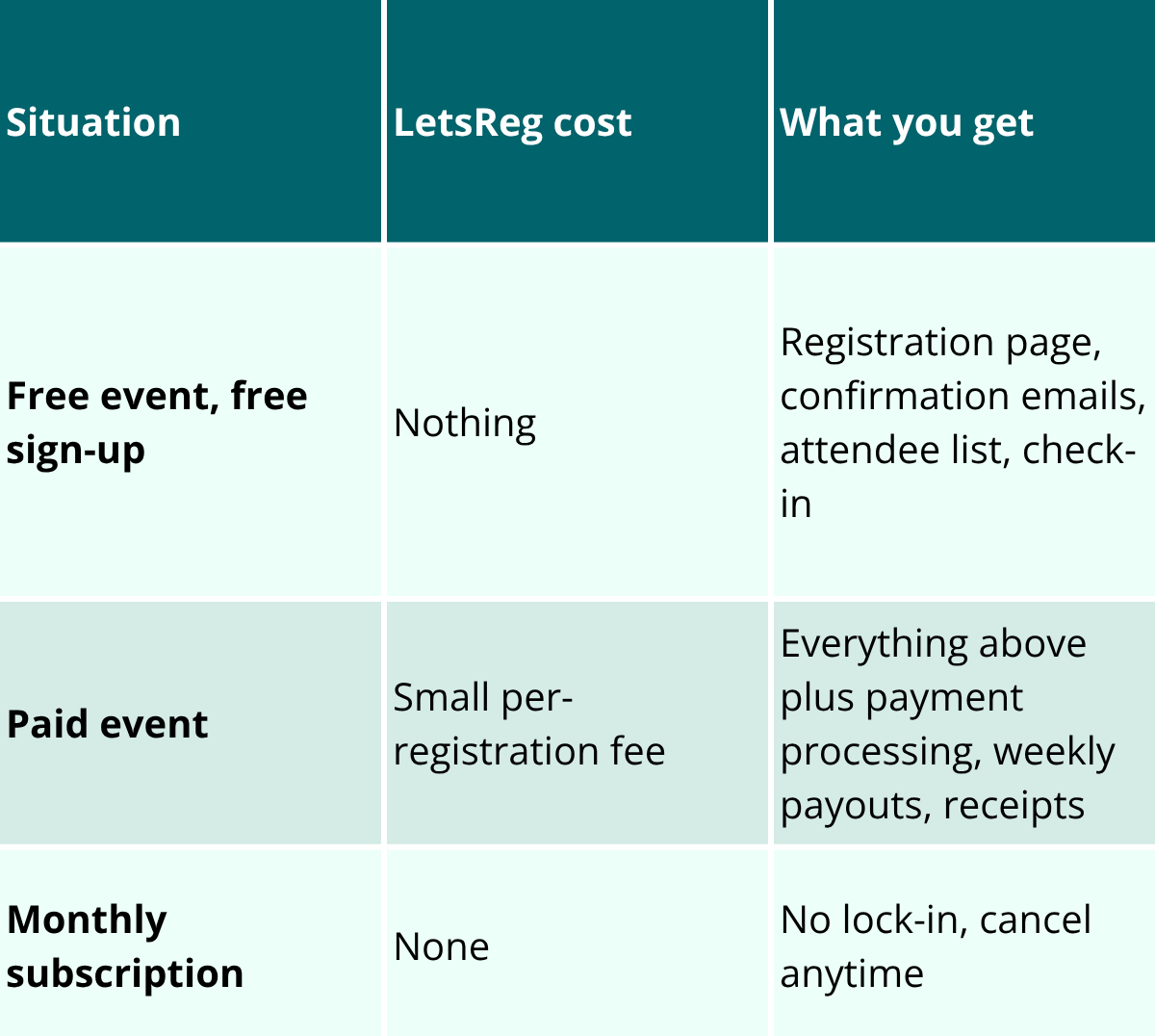
The only time a fee applies on LetsReg is when you take payment – that is, when attendees pay to attend your event.
For paid events, a small per-registration fee applies. There is no monthly subscription, no setup cost, and no contract. You can cancel at any time.
If your events are always free to join, you will never pay anything.
This matters if you run a mix; a community club that holds free taster sessions and paid term courses can use the same system for both, paying only when someone buys a paid place.
What kinds of free events do UK organisers run on LetsReg?
Community sports taster days — Football, cricket, volleyball open sessions where newcomers sign up for a free first session before joining a paid programme.
School and club open days – Where the event is free but the organiser still needs an accurate headcount and a way to communicate with attendees.
Free activity days – Several organisers use LetsReg to offer free trial sessions or activity days.
If your event is free to join, the system costs nothing. You get the same registration tools, confirmation emails, capacity management, and attendee messaging that paid event organisers use.
Do you need a booking system if you already use Eventbrite?
Eventbrite is widely used in the UK, but it is worth checking the fee structure for free events before assuming it costs nothing. Some platforms charge a per-ticket fee even on free registrations, or offer free-event features only on paid plans.
LetsReg charges nothing for free events — no per-ticket fee, no plan upgrade required. If you are already using another tool and paying for free sign-ups, that is worth reviewing.
You do not need one, but it saves significant admin. A booking system gives you real-time sign-up numbers, automatic confirmation emails, capacity limits, and a messaging tool to contact all attendees at once — even when no money changes hands. For events with more than twenty or thirty attendees, managing registrations manually via email or spreadsheet becomes time-consuming quickly.
Does LetsReg charge anything for free events?
No. When your event is free and sign-ups are free, LetsReg charges nothing. A fee only applies when you take payment for a paid event. There is no monthly subscription for the basic plan.
How do I limit the number of people signing up for my free event?
Set a capacity when you create the event. LetsReg closes registration automatically when you reach that number, so you do not have to monitor it yourself. You can also enable a waiting list so interested attendees are notified if a space opens.
Can I run both free and paid events on the same account?
Yes. You can run free events at no cost alongside paid events on the same LetsReg account. The fee structure only applies to paid bookings.
What information do I need from attendees when they sign up?
You choose. At a minimum, name and email address. You can add custom questions — dietary requirements, age groups, which session they want to join, or any other information you need to run the event.
Running a free event and want to stop managing sign-ups manually?